
SkyPlanner APS. Let the due date you promise be one the factory can keep.
SkyPlanner is a cloud-based APS solution that turns orders, capacity and materials into a finite-capacity production schedule. Its in-house Arcturus engine rebuilds the plan in seconds; the planning team sets the priorities and makes the final decision.
A schematic, not a product screen. The rows show four resources (CNC 1, CNC 2, Assembly, Paint), the columns six days from Monday to Saturday. S-101 starts locked on CNC 1, then moves on to assembly and paint; S-102, S-103 and S-104 are planned in the same routing order as the stations become free. S-105 slips towards the end of the week because it is waiting for material; S-106 is planned on CNC 1. The colours distinguish planned, locked and material-waiting jobs.
Fact sheet
- APS · Finite-capacity scheduling
- Skycode Oy · Vaasa, Finland (brand: SkyPlanner)
- Arcturus · the vendor’s own in-house scheduling engine
- Cloud (SaaS) · standard region EU/Germany for customers requiring EU data residency
- REST API v3 · signed webhooks · CSV · ERP connection optional
- Turkish UI, Turkish website and help centre
- More than 5,000 installations (SkyPlanner data, June 2026)
Request a live demo
Fill in the form to see the solution with your own processes; it comes preselected in the form, and our team contacts you to arrange the demo.
Request a demo02Who it is for
Manufacturers whose schedule is genuinely complex.
SkyPlanner is designed especially for manufacturers with discrete, make-to-order and mixed-mode production and a heavy scheduling load, and it is not tied to a single industry. The same schedule gives four teams and sales a view of their own:
03Which business problems it solves
There is a plan, but it was not built around capacity.
A real factory does not follow a fixed plan: rush orders cut in, materials are delayed, priorities change and some workstations are overloaded. Spreadsheets and systems that only track orders cannot carry this change.
04Core capabilities
A schedule true to capacity that responds quickly to change.
Capacity is never exceeded
Workstations, shifts, process steps, setup and teardown times, materials, fixtures and subcontractors are defined once. Arcturus treats them as hard limits and builds the schedule within those limits.
The plan is rebuilt in seconds
An order slips, a machine breaks down or a rush job arrives; the engine recalculates the whole plan according to the priorities the team has set.
All workstations and orders on one timeline
Jobs are moved by drag-and-drop, locked and edited. A proposed plan is compared side by side with the current plan and approved; the «King button» (reschedule all) recalculates the plan from scratch with a single button and keeps the locks.
Targeted replanning only when needed
It steps in when there is a new order, a completed job, a capacity outage or a material delay. Its principle is clear: if nothing changes, the plan stays where it is. Locks and rules apply in every case.
Weighted, multi-level priorities
Due date, completion date, customer and job priority, sequencing similar jobs back to back; task and order locks, a time lock on work in progress; forward and backward planning.
Shifts, stock, fixtures and subcontracting
Recurring shifts and calendar exceptions; forward-looking stock simulation and response to material delays; alternative workstations; fixture and mould management; subcontracted work planned like a workstation.
Operator time tracking
Every operator has a job queue and a timer that works with a single tap. Progress is reflected in the schedule instantly; the recorded times improve later duration estimates. A mobile view is also available.
Drag-and-drop dashboards
Load and capacity utilisation, late jobs, planned versus actual efficiency, delivery reliability, OEE and quality reports; personal dashboards and display on a production screen.
Images from the product
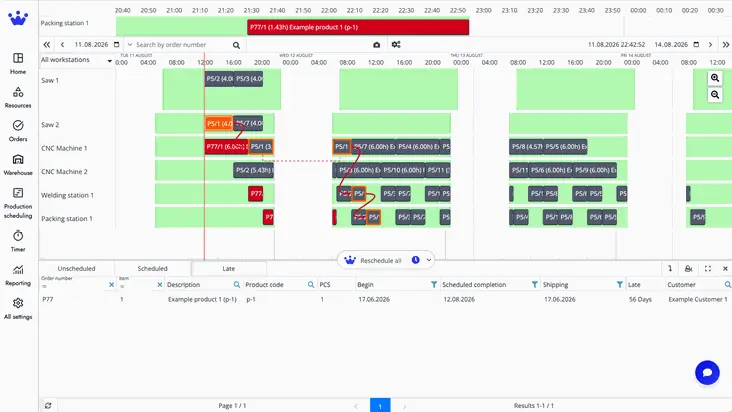
A late job on the Gantt and the rescheduled chain. 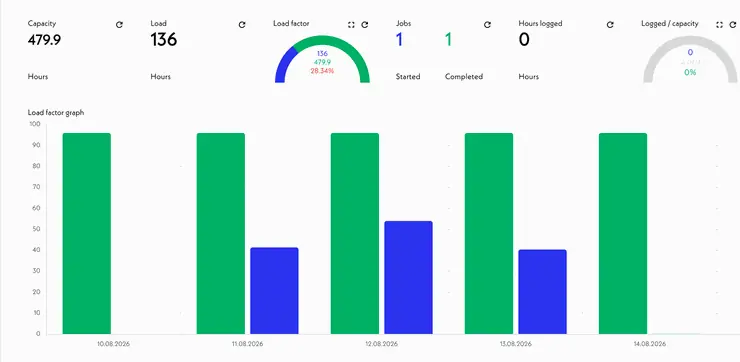
Workstation capacity and daily load factor. 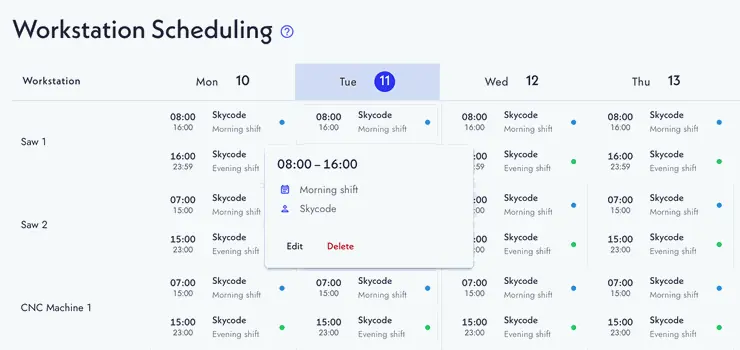
Shift plan by workstation and by day.
05How it works
Define production once, and the orders start to flow.
Setup starts small and deepens step by step. The division of labour is clear: the planning team sets the goals and constraints, Arcturus calculates the plan, and the team has the final say.
1. Model production · 2. Bring in the orders · 3. Draw the routing in the visual editor · 4. Arcturus calculates the plan · 5. Replan on change · 6. Connect the ERP when ready
06Modules and functional areas
Six capability groups and an optional assistant.
The pricing page gathers the core capabilities into six groups and states that the number of workstations determines the capacity scheduled, not the features. SkyPlanner Agent appears on the features page as a separate, optional AI assistant.
- AI schedulingAI-assisted optimisationFinite capacityDynamic prioritiesAlternative workstations
- Workstations & capacityWorkstation calendars and shiftsCapacity managementWorkstation groups
- Orders, products & process stepsOrder schedulingProducts and routingsProcess steps and dependenciesGantt timeline
- Shop-floor executionReal-time job trackingShop-floor recording screenProgress and completion trackingEfficiency factors
- Materials & warehouseMaterial-driven schedulingMaterial availabilityWarehouse balances
- Reporting, access & integrationsDashboards and reportsProduction analysisRoles and permissionsREST API access
- SkyPlanner Agent (BETA)An optional AI assistant that works in natural language
07Industries
From discrete to process manufacturing, industry-agnostic.
SkyPlanner is not packaged by industry; the industry tags on the homepage reflect this breadth. The published customer stories cover sheet metal, roof safety products, pharmaceuticals, food packaging and contract machining.
08Integration and API
ERP connection optional; REST API and signed webhooks ready.
SkyPlanner also works on its own; ERP integration is not mandatory. When a connection is needed, it is set up in one of three ways and does not have to be real-time: scheduled batch synchronisation, on-demand data pulls or event-triggered webhooks.
Orders, bills of materials and routings, stock balances, purchasing data and capacities from the ERP or MES come together in SkyPlanner, which is accessed through REST API v3 with the Authorization-Token header. Planned start and finish times, material usage, job status and time records are written back to the ERP or MES; status events are delivered by webhooks that are signed with HMAC-SHA256 when a secret key is defined.
Turnkey, with a solution partner or with your own team
The SkyPlanner team can build the integration end to end, one of SkyPlanner’s solution partners can develop it, or your software team can build it itself with the documented REST API and Swagger documentation.
One connection, two directions
Orders, products and materials, bills of materials, capacities, stock balances, purchasing data and routings are taken from the ERP. Planned start and finish times, changed schedules, job status, time records and material consumption are written back.
OpenAPI 3.0 · Authorization-Token header
The documented API covers orders, process steps, workstations, materials, stock and time records across 77 paths; scheduling is triggered from outside through the /ai-actions/schedule, /reschedule and /unschedule endpoints. API access is included in the subscription.
Signed event notifications
Events such as a job starting or completing, an order being created or updated or a schedule being confirmed (e.g. JOB_STARTED, SCHEDULING_CONFIRMED) are delivered as HTTP POSTs with a JSON body. If a secret key is defined, each request carries an HMAC-SHA256 signature in the X-Webhook-Signature header.
Listed ERP, MES and PLM systems
Microsoft Dynamics 365 (Business Central, SCM), SAP S/4HANA, Oracle NetSuite, Oracle Fusion Cloud Manufacturing, IFS Cloud, Infor, Epicor, Sage X3, Acumatica, QAD, SYSPRO, proALPHA, DELMIAWorks, BatchMaster, ERPNext, Odoo, Siemens, Windchill, Onshape; also QuickBooks, Google Sheets, Monday.com and Asana. SkyPlanner states explicitly that there is no certified out-of-the-box connector for each of them; integration is built per project.
MindDX’s Odoo integration
A bidirectional integration with Odoo is ready: work orders go from Odoo to SkyPlanner, and the scheduled plan comes back to Odoo.
Explore Odoo09AI and automation
Arcturus: a scheduling engine, not a chatbot.
SkyPlanner describes Arcturus as an engine developed in-house and built specifically for finite-capacity scheduling. It is not an interface or chatbot built on top of a third-party AI model; it optimises the plan according to the priorities the team sets.
A finite-capacity plan from live data
It reads live production data, rebuilds the plan in seconds and works by the rules the team has defined.
Not trained on customer data
Arcturus needs no training on customer data in order to work, and it is not retrained on customer data during operation. Duration estimates become realistic with your own time records.
The engine calculates, the team decides
Planners set the goals, constraints and priorities; Arcturus calculates. The team accepts, locks, drags or changes the plan; Autopilot is optional.
An assistant that works in natural language
It creates orders, queries production status, schedules unscheduled jobs and explains features; it shows what it has changed. It is an optional add-on, separate from Arcturus; the external services it uses are disclosed before the module is activated.
The limits SkyPlanner draws itself: the Agent supports the team and does not run the factory on its own. According to the terms of service (v2.1, 7 May 2026), AI outputs are «for information and advisory purposes only».
A four-step loop: the planning team sets the goals, constraints, priorities and locks → Arcturus calculates a finite-capacity plan from live data → the team accepts, locks or changes the plan → the optional Autopilot replans in a targeted way only when something changes. Locks and rules are kept in every round.
10Deployment · security · releases
SaaS that runs in the browser; the Germany region for EU data residency.
The information below is based on SkyPlanner’s terms of service, privacy policy and pricing page.
11Decision criteria
Where it is a strong candidate.
The criteria below are derived from SkyPlanner’s published capabilities; whether they hold for your production is tested with evidence in Assess.
When it is a strong candidate
Whether APS is the right category, and whether SkyPlanner can carry your constraints, is established with evidence in Assess.
12Questions
Frequently asked before a decision.
Answers about the product rest on the vendor’s official sources; for the current state, see the sources section.
No. SkyPlanner turns orders, capacity and materials into a finite-capacity schedule; the ERP remains the system of record for orders, stock and cost. It can be used on its own, and the ERP connection can be set up later.
No. Arcturus recalculates the schedule in seconds according to the priorities the planners set; accepting, locking or changing the plan is up to the team. The engine is not a chatbot and is not trained on customer data.
The connection is built with the documented REST API v3, signed webhooks or a project-based integration service, and it does not have to be real-time. Which data flows in which direction, and how often, is determined in Assess and scoped in Design.
For customers requiring EU data residency, the standard cloud deployment is in the EU/Germany region. A different region is documented in the customer agreement, the order form or the data processing agreement (DPA).
Yes. The interface is offered in 29 languages, Turkish included; there is a Turkish website and a comprehensive Turkish help centre.
Yes. According to SkyPlanner, the software works standalone: orders can be typed in or imported from a CSV file, and the ERP can be connected later through the REST API, webhooks or an integration project.
The production model is described once: workstations, shifts, process steps and their order, setup and teardown times, materials, tools and subcontractors. Arcturus treats all of them as hard limits and schedules inside them.
According to SkyPlanner, no: Arcturus does not need training on customer data and is not retrained on customer data during operation. Scheduling runs on the company’s own production model and rules.
According to SkyPlanner, yes, as named features: subcontractors are scheduled like workstations, a tool or mould cannot be in two places at once, and batch jobs that combine parts from several orders are scheduled as one.
In SkyPlanner, products are given properties such as colour, material or tool, and each workstation can group jobs that share a property, so the changeover happens once per group instead of between every job. Arcturus weighs that gain against due dates and other priorities.
According to SkyPlanner, the trial lasts 30 days and needs no credit card; with self-onboarding it covers up to 20 workstations, using sample data or your own production data. For larger setups the vendor recommends assisted onboarding.
As a SkyPlanner partner, MindDX sells licences and provides implementation services for SkyPlanner APS. Assessment, design, integration scoping, training and support are also among the roles it can take on; which of them it takes on in your project is written explicitly into the proposal, together with the validated scope.
This page gives no product price, licence, edition fee or duration. They are shared by a consultant after the scope has been validated.
13Related content and sources
Related solution categories
Related insights
Sources and verification
14How to start with MindDX
The road to this product does not start with the product.
The APS decision is made in your processes, not in a demo. Assess shows, with reasons, whether the need is met by standard capability and settles what changes, why and in which order as a validated scope; the implementation proposal comes out of that scope.
As a SkyPlanner partner, MindDX sells licences and provides implementation services for SkyPlanner APS. Which roles MindDX takes on in your project — licence, assessment (Assess · Checkup / Discover / Audit), fit / gap analysis, solution design, implementation, integration scoping, process redesign, training and support — is written explicitly into the proposal, together with the validated scope.
SkyPlanner is not a MindDX Platform module and there is no technical integration between the Platform and SkyPlanner. The Platform governs selection and readiness with evidence: assessment, requirements, evidence, BPMN design and decision → design → test → acceptance traceability.
MindDX Platform