
Zoho CRM. The sales process is defined first, then run in the CRM.
Zoho CRM is a cloud-based CRM that manages sales, marketing and customer service on the same customer record. The sales process is defined step by step with Blueprint; Zia AI is added to that process through its prediction, recommendation, content-generation and agent layers.
A five-step flow: Lead (an unqualified prospective customer); conversion (the qualified lead is turned into records); Contact and Account (the person and the company they belong to); Deal (a deal linked to the contact and the account); pipeline stages (transitions can be defined with Blueprint).
Fact sheet
- CRM · Sales pipeline management
- Zoho Corporation Pvt. Ltd. · Chennai, India
- Free · Standard · Professional · Enterprise · Ultimate
- Cloud (SaaS) · 10 data-centre pairs
- REST API v8 · OAuth 2.0 · MCP servers
- 28 languages · Turkish included
See Zoho CRM at work
Zoho’s «CRM for everyone» video: sales, service, marketing, legal and onboarding teams each work in their own view of the same Zoho CRM.
Try Zoho for free
Choose the Zoho application that fits you; the trial account opens on Zoho’s own sign-up page, in a new tab.
- Zoho CRMSales tracking and pipeline visibility, for teams moving from spreadsheets to a CRM.Free trial: Zoho CRM
- Zoho CRM PlusSales, marketing and customer service on one omnichannel platform.Free trial: Zoho CRM Plus
- Zoho OneAn application suite connecting CRM, finance, operations, HR and analytics.Free trial: Zoho One
- Zoho DeskSupport requests from email, chat and web forms, managed against SLAs.Free trial: Zoho Desk
02Who it is for
From a small sales team to a mature sales organisation.
Zoho positions its editions by team maturity: Standard for small teams just getting started, Professional for growing teams that need automation, and Enterprise for mature sales organisations. The user profiles highlighted on the official pages:
03Which business problems it solves
Leads come in; the process varies from person to person.
Typical problems Zoho CRM targets in sales organisations:
04Core capabilities
Capabilities that carry the sales process end to end.
Capture, deduplication and scoring
Leads are captured from web forms, a business-card scanner, social media and email; duplicate records are merged. Scoring is rule-based or done with Zia; multiple pipelines and parent–subsidiary structures are supported.
Workflow, Blueprint, Cadences and Journey Builder
Trigger–condition–action rules (up to 2,500 per organisation); Blueprint, which ties stages to rules; Cadences for scheduled follow-up sequences; approval processes; Kiosk Studio for no-code screen flows; customer journey orchestration with CommandCenter and Journey Builder.
Email, telephony, messaging and meetings
Gmail, Outlook and Zoho Mail integration; calling through telephony providers; WhatsApp Business, LINE and SMS; online meetings; website visitor tracking with SalesIQ.
Reports, dashboards and sales forecasts
Standard and custom reports; forecasting by team, territory and period; separate tracking of the Committed, Best Case and Open categories; Zia anomaly alerts; cross-analysis with Zoho Analytics.
Target hierarchy, quotes and order documents
Territory and target hierarchies by geography, team and person; CPQ (configure–price–quote) with product bundles and dynamic pricing rules; quote, sales order and invoice documents.
Canvas, custom modules, Client Script and sandbox
Record screens are redesigned with Canvas; conditional layouts, custom modules and buttons are added; Client Script runs business logic on the browser side. Changes are tested in a sandbox before they go live.
Campaigns, segments and web forms
Mass email and autoresponders, Google Ads integration and account-based marketing (ABM).
Working offline in the field
The iOS and Android apps can also be used offline; a business-card scanner, visit check-ins and a separate Analytics app are offered.
Images from the product
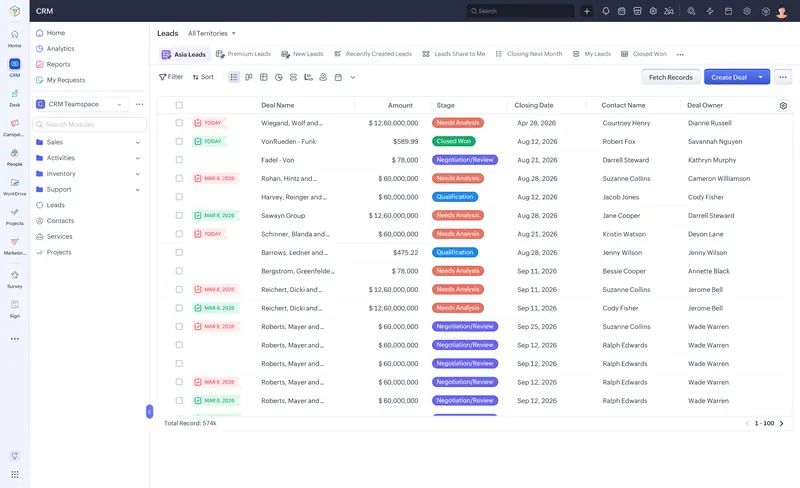
Sales records by stage, amount and owner in one list.

05How it works
From lead to deal: data model and automation.
Zoho CRM’s record structure and automation layer, in five steps:
1. Lead → Contact, Account, Deal · 2. Pipeline and Blueprint · 3. Condition → action automation · 4. Serverless business logic with Functions · 5. Low code and full code together
06Modules and functional areas
Standard modules and custom modules.
Zoho CRM’s standard modules are listed below. Custom modules can be created from the Standard edition up; the ceiling ranges from 10 to 500 depending on the edition.
- Leads · Contacts · Accounts · DealsThe core records of sales force automation
- CampaignsMarketing campaigns
- Products · Price Books · VendorsProduct catalogue, price lists and suppliers
- Quotes · Sales Orders · Purchase Orders · InvoicesQuote, order and invoice documents
- Cases · SolutionsSupport cases and a solutions knowledge base
- Tasks · Calls · MeetingsTask, call and meeting records
- Services · AppointmentsService catalogue and appointments
- Custom modulesCustom modules for business-specific data
07Industries
Industry-specific solution pages.
Zoho CRM’s Enterprise page publishes separate solution pages for seven industries. Manufacturing is not on this list; in manufacturing companies, the sales process is modelled with standard modules, custom modules and Blueprint.
08Integration and API
REST API v8, MCP and more than 1,200 integrations.
Programmatic access to Zoho CRM is through REST API v8, with OAuth 2.0 scopes. According to Zoho, the product has more than 1,200 ready-made integrations. Usage is limited by API credits that depend on the edition and the number of users.
Programmatic access: REST API v8 (OAuth 2.0 scopes, 11 SDKs), the Bulk and Notification APIs (200,000 records per export), COQL and GraphQL queries, four MCP servers (with user permissions), webhooks from workflows. At the centre, Zoho CRM and the 24-hour API credit. Ready-made connections: Zoho apps (Books, Desk, Analytics), more than 1,200 integrations according to Zoho, and QuickBooks and Zoho Finance Suite on the accounting side.
v8 · OAuth 2.0 scopes
Metadata, Core, Composite (at most five calls in one request), Bulk, Notification and Query APIs; 11 official SDKs, including Java, Python, Node.js, PHP and C#.
Bulk API, COQL and GraphQL
Bulk reads of up to 200,000 records per export job; 2,000 records per call in COQL and 10,000 per resource in GraphQL. The Notification API notifies an external system of record changes; notification channels expire and have to be renewed.
API credits and concurrency
The credit budget is calculated for a 24-hour period based on the edition and the number of users; the concurrent-request limit ranges from 5 to 25 depending on the edition. Webhook calls triggered from workflows also have a separate daily cap.
Four ready-made MCP servers
Data Insights (read-only), Data Operations, Module Customization and Workflow & Process Automation. The connection is established with OAuth; every operation is limited by the user’s CRM permissions and consumes API credits.
Ready-made connections within the same family
Zoho Books, Invoice, Expense, Inventory and Billing (Finance Suite); Desk, Projects, Analytics, Campaigns, SalesIQ, Creator and Flow.
Named applications
QuickBooks, Adobe Sign, PandaDoc, Mailchimp, Shopify, Zapier, Slack, Zoom, Microsoft Teams and Google Ads. On the accounting side, the named connections are QuickBooks and Zoho Finance Suite; a connection to another ERP is scoped as a separate project via the API.
09AI and automation
Zia: four layers, from prediction to agents.
Zoho positions Zia in four layers: predictive, prescriptive, generative and agentic intelligence. AI agents and predictive intelligence are in the Professional edition; extended AI capabilities are in the Enterprise edition.
Churn risk, Zia scores, anomaly alerts
Churn prediction, field prediction, sales forecasting and anomaly detection; a recommendation builder and workflow suggestions.
Generating content and configuration
According to Zoho, Zia can create modules, reports and workflows in seconds. It writes email drafts, summarises emails and classifies sentiment and intent.
Agent Studio and Agent Store
Ready-made agents are taken from the Agent Store, or a custom agent is built in Agent Studio. An agent is deployed either as a «Connection» that works under the user’s identity or as a «Digital employee» with its own identity.
Smart Prompts and Zia Chat
Smart Prompts uses ChatGPT, Gemini, Claude, Cohere, Deepseek and SiliconFlow models with your own API key, or models hosted by Zoho. Zia Chat, announced on 23 Sep 2026, works independently of the model and respects user permissions.
QuickML
Custom machine-learning models, and endpoints that access them, are built through a drag-and-drop interface.
Zia and agents working through MCP are limited by the user’s CRM permissions and consume API credits. The Zia Agents CLI has not been released yet («Coming Soon»). The accuracy of AI outputs, and how data is shared with external model providers, should be assessed separately at the pilot and contract stage.
Four layers: predictive (churn risk, Zia scores, anomaly detection, sales forecasting); prescriptive (recommendation builder, workflow suggestions); generative (creating modules, reports and workflows, email drafts and summaries); agentic (Agent Studio, Agent Store, deployment as a Connection or a Digital employee).
10Deployment · security · releases
Cloud only; the data centre is determined by the country of registration.
Based on Zoho’s security, compliance, data-centre and edition pages:
11Decision criteria
When it is a strong candidate.
The criteria are derived from the capabilities Zoho publishes; whether they hold for your processes is established in Assess.
When it is a strong candidate
How your sales cycle is modelled in Zoho CRM, and which edition is enough, is established with evidence in Assess.
12Questions
Frequently asked before a decision.
Answers about the product rest on the vendor’s official sources; for the current state, see the sources section.
Yes. The UI is offered in 28 languages, Turkish included. There is no Turkish Zoho CRM website and no data centre in Turkey; the support language and any need for Turkish documentation should be clarified at proposal stage.
The data centre is determined by the country selected when the account is opened. Among Zoho’s ten data-centre pairs, the EU has Amsterdam (primary) and Dublin (secondary); however, which centre an account opened from Turkey will be connected to is not published and must be confirmed in writing.
Zoho offers five editions: Free (up to 3 users), Standard, Professional, Enterprise and, for large-scale deployments, Ultimate. The right edition is determined in Assess according to the need for Blueprint, custom modules, API credits and AI.
Zoho CRM offers REST API v8, webhooks, MCP servers and more than 1,200 ready-made integrations. The accounting connections named on the official pages are QuickBooks and Zoho Finance Suite; integration with another ERP is scoped as a separate work package in the Design phase.
Zoho CRM is a sales-focused CRM for managing leads, accounts, deals, activities and forecasts in one place. According to Zoho, its core functions help sales teams track leads, turn them into deals and build lasting customer relationships.
Zoho CRM focuses on the sales team. Zoho CRM Plus is a customer experience platform that brings sales, marketing and service teams together with their customer information in one interface. Zoho One is a broader suite that unites sales, marketing, support, finance, HR and operations in one system.
Spreadsheets invite version conflicts, manual data entry and inconsistent stages. Zoho CRM standardises the sales stages, protects data quality with required fields and rules, automates follow-ups and gives managers up-to-date dashboards.
According to Zoho, CRM Plus offers sales automation, SalesInbox (an email client for salespeople), marketing campaigns, customer service, website engagement, analytics and team collaboration tools in one interface. Teams work in the same customer context across several channels.
Yes. According to Zoho, Zoho Desk and Zoho CRM work together: sales reps can answer tickets from inside the CRM and are notified when their lead raises a ticket, while support agents see the related deal details inside the ticket.
According to Zoho, Zoho CRM is a pay-as-you-go service, monthly or yearly, without a long-term commitment; the plan can be upgraded or changed from within the account as needs change.
As a Zoho partner, MindDX sells licences and provides implementation services for Zoho CRM. Assessment, design, integration scoping, training and support are also among the roles it can take on; which of them it takes on in your project is written explicitly into the proposal, together with the validated scope.
This page gives no product price, licence, edition fee or duration. They are shared by a consultant after the scope has been validated.
13Related content and sources
Related solution categories
Related insights
All insightsSources and verification
14How to start with MindDX
The road to this product does not start with the product.
The CRM decision is made in your processes, not in a demo. Assess shows, with reasons, whether the need is met by standard capability and settles what changes, why and in which order as a validated scope; the implementation proposal comes out of that scope.
As a Zoho partner, MindDX sells licences and provides implementation services for Zoho CRM. Which roles MindDX takes on in your project — licence, assessment (Assess · Checkup / Discover / Audit), fit / gap analysis, solution design, implementation, integration scoping, process redesign, training and support — is written explicitly into the proposal, together with the validated scope.
Zoho CRM is not a MindDX Platform module and there is no technical integration between the Platform and Zoho CRM. The Platform governs selection and readiness with evidence: assessment, requirements, evidence, BPMN design and decision → design → test → acceptance traceability.
MindDX Platform